Client RA Billing – running account bills for building and road projects
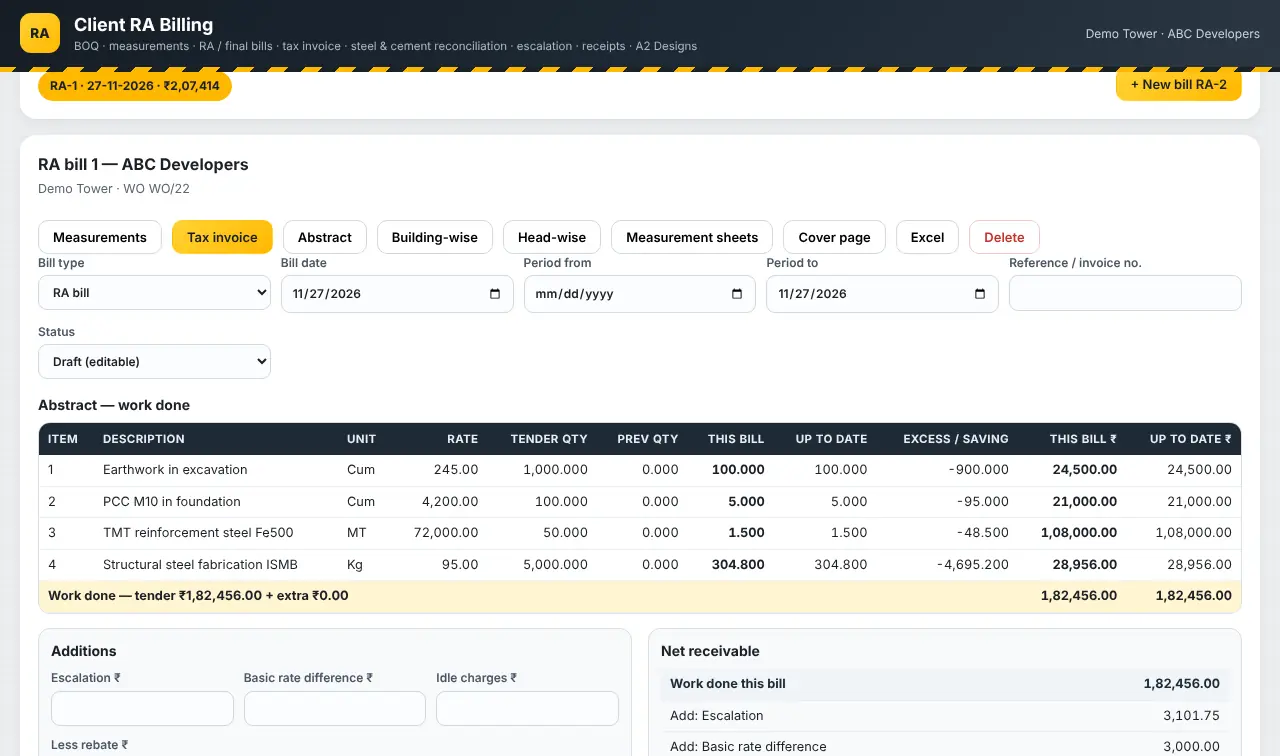
Enter your BOQ once and record measurements bill by bill. Every RA bill builds its own abstract with tender, previous, this-bill and up-to-date quantities, a GST tax invoice, recoveries and net receivable — and the dashboard tracks what the client has paid.
What Client RA Billing does
BOQ with tender & extra items
Item heads, SAC codes, units, rates, tender quantities and cement norms; paste your BOQ straight from Excel.
Measurements
Nos × L × B × D, chainage-based lengths for roads, dia-wise reinforcement steel and structural steel by section weight.
Tax invoice & abstract
GST split into CGST + SGST or IGST by place of supply, abstract grouped by item head, excess / saving against tender.
Recoveries & receipts
Retention, income-tax and GST TDS, labour cess, mobilisation and material advance, water, cement bags, debit notes; receipts per bill.
Reconciliation
Dia-wise steel, cement and structural steel reconciliation with allowed wastage, plus basic rate difference from purchase invoices.
Price escalation
Component-wise escalation (labour, material, fuel, bitumen, steel, cement) from base and current indices, added to the bill.
See Client RA Billing in action
How it works
- Enter company, client and work-order details, then paste your BOQ.
- Record measurements for each bill — building-wise or chainage-wise.
- Create the RA bill, print the invoice and abstract, and record receipts.
Made for: Contractors and billing / QS engineers who raise bills on clients for building, industrial and road works.
System requirements
- Any modern web browser: Chrome, Edge, Firefox or Safari (latest versions)
- Windows, Mac, Linux, Android or iPhone; no installation
- Internet connection to sign in and save to the cloud
- Excel downloads open in Microsoft Excel, LibreOffice or Google Sheets
- Laptop or desktop recommended for long data entry; phone works for viewing and quick work
Support
- Help on WhatsApp: +91 80189 21731
- Built-in help desk inside the member area
- Setup guidance when you start, plus help with your first project
- Licence, renewal and storage shown in My tools
Client RA Billing pricing
| Plan | Price |
|---|---|
| Free trial | 3 days free · no payment needed |
| Paid plans | Loading… |
Prices include access for one member account. Payment by UPI; your licence starts when payment is confirmed.
Questions about Client RA Billing
Does it handle road projects?
Yes. Switch the project to Road: stretches replace buildings and the chainage from / to fills the measured length.
How is GST worked out?
GST is applied on the taxable value (work done plus escalation, basic rate difference and idle charges, less rebate) and split into CGST + SGST or IGST from your state and the place of supply.
Can I export the bill to Excel?
Yes. The abstract is exported with live formulas linked to the measurement sheet, down to the net receivable.
Is there a free trial?
Yes, 3 days free for every new member.
Try Client RA Billing free for 3 days
Built by a practising civil engineer. Your work is saved in the cloud.